Can’t access your WordPress admin all of a sudden? Fixing the 403 Forbidden error (Allow domestic access issue)
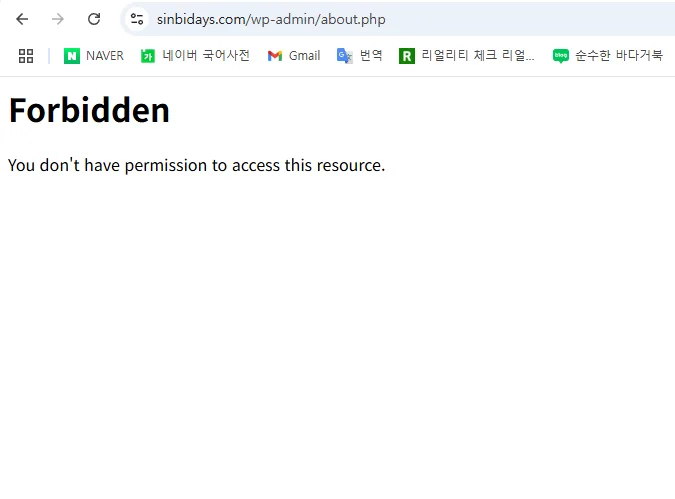
One setting that reopened “my WordPress that got blocked”
One day, I tried to log into the admin page to write a post, like I always do.
But then…
A single unfamiliar message appeared in front of me.
403 Forbidden – You don’t have permission to access this resource.
“…What is this? Did I mess with something?”
“It was fine until yesterday—why is it doing this?”
At first, I panicked. I hadn’t installed any new plugins or changed my theme.
My hosting on Cafe24 had been running fine, and I couldn’t remember doing anything that would cause a problem.
But I still couldn’t access the admin page…
My mind went blank… and my blog, Shinbi Days, felt like it was locked. 🥺
🧩 The cause was surprisingly simple
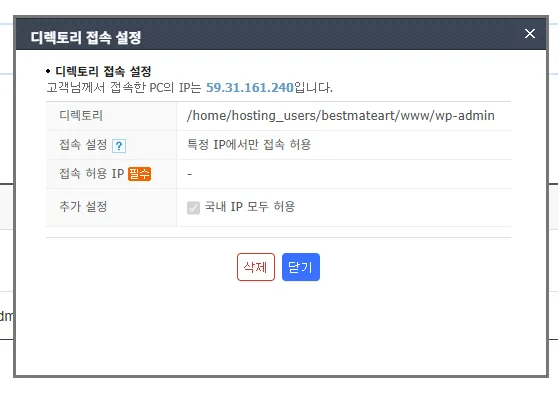
Cafe24’s security setting called “Allow access only from within Korea.”
That was the problem.
I was clearly accessing from Korea, and my IP was a domestic one…
But the Cafe24 server mistook my access as coming from overseas.
Here’s why this can happen:
- Some networks (especially mobile LTE/5G, school/company Wi‑Fi) can make your IP route look like it’s overseas
- If you use Cloudflare, a CDN, etc., your IP may appear through a proxy
- The server-side IP database may be outdated and inaccurate
So in the end, I was in Korea, but got blocked while being treated like a “foreigner”. 😢
(That stings, my friend…)
🛠 How to fix it (really simple)
Thankfully, once you find the cause, the fix is easy!
✔ Method 1 – Turn off the security setting (Cafe24)
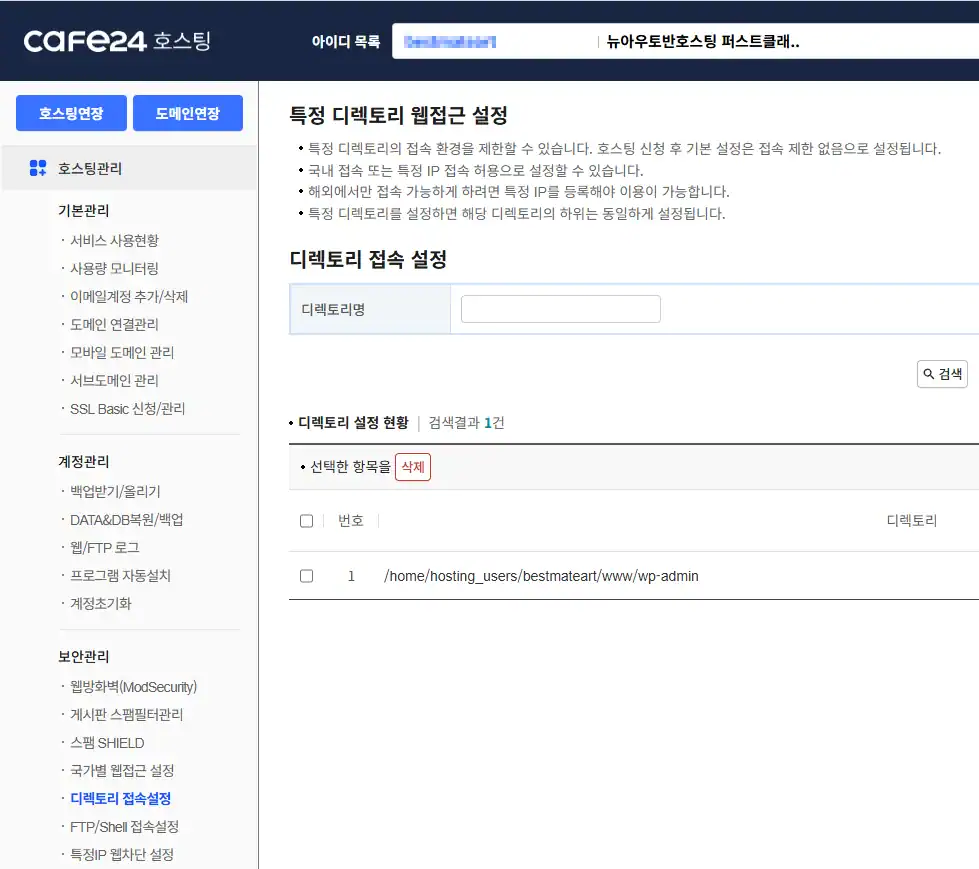
- Go to the Cafe24 Hosting Center
- Go to [Security Management] → [Directory Access Settings]
- Disable the “Allow domestic access only” option
→ And you can access the admin page right away!! 🎉
💡 For reference, these situations can happen too
| Situation | Causes |
|---|---|
| Blocked even while in Korea | IP is mistaken as overseas (proxy, carrier network, CDN, etc.) |
| Only the admin can’t access | WAF/ModSecurity blocks wp-admin |
| Only some images don’t load | Hotlink protection or a path error |
| Still doesn’t work even after renaming the plugin | A security module blocks everything |
🔧 Bonus tips – If this happens again, try this!
.htaccessBack up files, then reset (to WordPress defaults)- Disable security plugins (Wordfence, etc.)
- Clear your browser cache before trying to access the admin page again
- Access via FTP and temporarily disable any suspicious plugins in
wp-content/plugins - If it still doesn’t work, ask Cafe24 Support whether ModSecurity is blocking you!
▼ An AI-written emotional diary about the 403 error
✨ Wrap-up – Because the blog is my space
There’s one thing I learned from this experience.
Even if I’m careful, the system sometimes misunderstands me.
But when that happens, don’t panic—just narrow down the cause slowly.
Whether it’s the server or security settings,
it felt like a process of learning, little by little, how to protect my space.
If you’re reading this right now
and feeling flustered because you can’t access your admin page,
I truly hope this post helps.
—
📘 Shinbi Days – A blog of emotion and growth
🌿 A little each day, living as myself


![💚 [Review] A Ray of Light on a Tiring Day: Receiving the IVE An Yu-jin ‘Narasarang Card’ 💌](https://sinbidays.com/wp-content/uploads/2026/02/An-Yu-jin-Card-1024x539.jpg)