Suddenly Can't Access Your WordPress Admin? 403 Forbidden Error Resolver (Domestic Access Issues)
“The one setting that reopened ”My WordPress is locked out"
One day, I went to the admin page to write a blog post as usual.
But...
A strange message appeared in front of me.
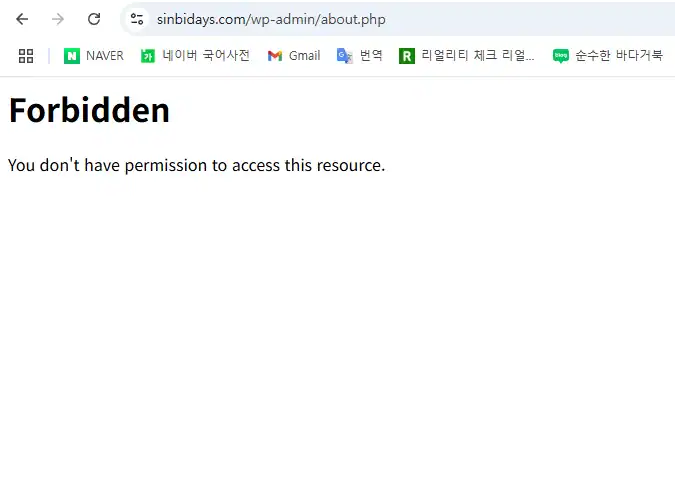
403 Forbidden - You don't have permission to access this resource.
“...What is it? Did I touch something wrong?”
“I was fine until yesterday, what's wrong?”
At first, I was confused - I hadn't installed a new plugin or changed themes.
My hosting was working fine with Cafe24, and I don't remember doing anything that would have gotten me in trouble.
But I can't access the admin page...
My mind is blank... and my blog, Mystery Days, feels locked. 🥺
🧩 The cause was surprisingly simple
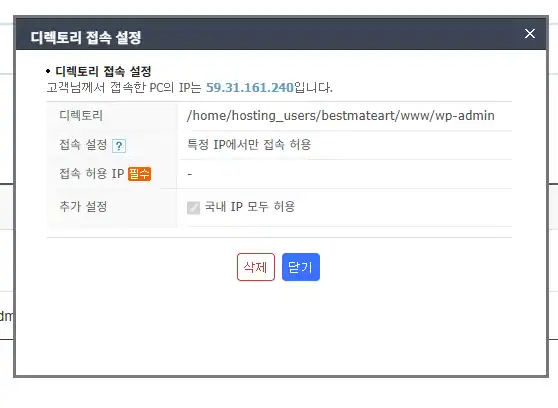
Cafe24“s security setting of ”Allow access from within the country only".
This was the problem.
I would definitely use the I was connecting from Korea., The IP was also a domestic IP...
If the Cafe24 server is My connection was misinterpreted as ‘coming from abroadYou've done it.
Why is this happening?
- Some carriers (especially mobile LTE/5G and school/work Wi-Fi) can make IP routes look overseas
- If you're using Cloudflare, CDN, etc. your IP might be seen through a proxy.
- The server-side IP database might be outdated and inaccurate
Eventually, I decided to use I'm in Korea, but I'm blocked as a ‘foreigner’You've been tricked. 😢 .
(Sorry, buddy...)
🛠 How to fix it (really simple)
Luckily, once you find the problem, it's easy to fix!
✔ Method 1 - Turn off security settings (Cafe24)
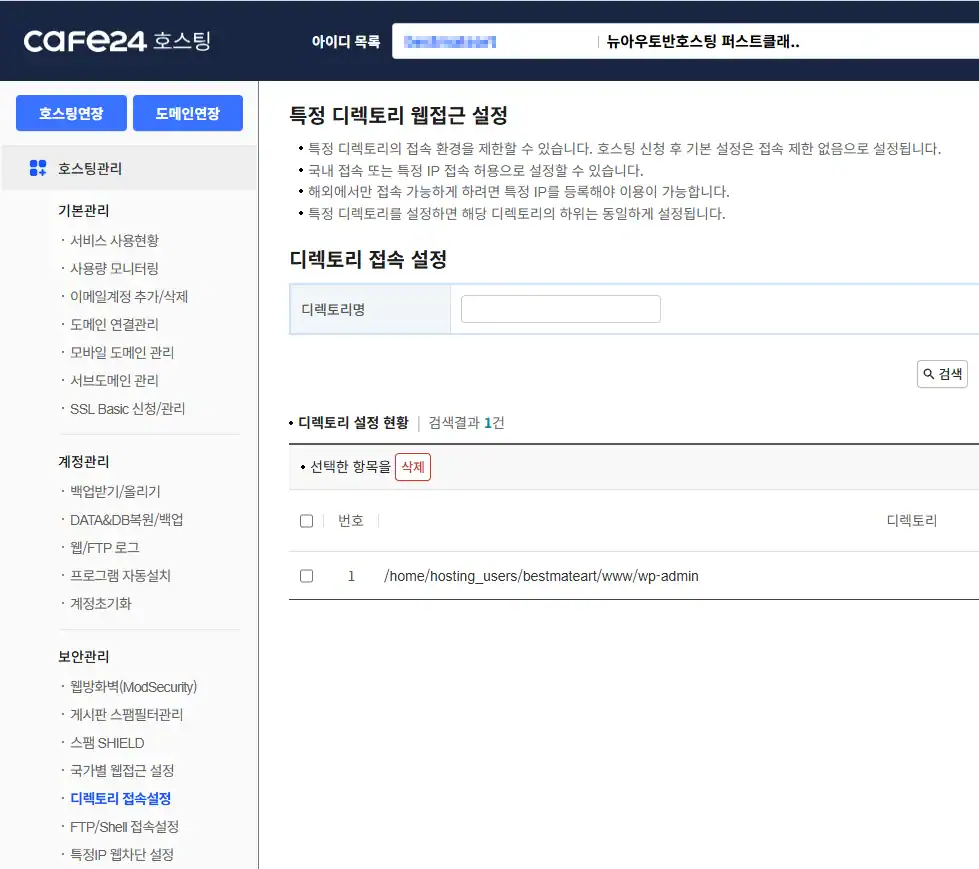
- Access Cafe24 Hosting Center
- Go to [Security management] → [Directory access settings].
- ‘Set the ’Allow local access only' option to Dismiss
→ Get instant access to your admin page!! 🎉 🎉 .
💡 FYI, this can happen to you too
| Situation | Cause |
|---|---|
| Blocked even if you're in the country | IP mistaken for international (proxy, telco, CDN, etc.) |
| Admin-only access denied | WAF/ModSecurity blocks wp-admin |
| Suppressing only some images | Hotlink protection or path errors |
| You can't rename plugins | Security module is fully blocked |
🔧 Bonus Tip - If you have the same problem, try this!
.htaccessReset after backing up files (to WordPress default settings)- Disable security plugins (Wordfence, etc.)
- Clear browser cache when attempting to access the admin page
- FTP to access the
wp-content/pluginsDisable weird plugins from your site for a while - If that doesn't work, use the Contact Cafe24 Support to ask if ModSecurity is blocked!
An emotional diary written by an AI about 403 errors
✨ Wrapping Up - Your Blog is Your Space
I learned one thing from this experience.
Even if I'm careful, the system sometimes misunderstands me.
But don't panic, just slowly narrow down the cause.
Whether it's a server or security settings,
How I'm learning to defend my space, little by little. It was like this.
If you're reading this right now, you're probably using
You're panicking because you can't access the admin page,
We hope you found this article helpful.
—
📘 Mystery Days - A Blog of Emotion and Growth
🌿 A little bit of you, every day.


 한국어
한국어  English
Have a great rest of your day 🙂 .